2025.03.14
강의 53,54강 수강
#1
강의 수강: Unity Turn-Based Strategy Game: Intermediate C# Coding
53. Health System (07:52)
HealthSystem 스크립트를 만들어 Unit Prefab 에 부착. 해당 스크립트에서는 체력 수치를 관리하고 public Damage() 메서드를 갖고 있고, 체력이 0이 되었을 때 실행되는 OnDead 이벤트를 제공한다.
54. Ragdoll (15:41)
Unit Prefab 을 복사해서 UnitRagdoll Prefab 생성. 부착되어있던 모든 컴포넌트 삭제. 내부에 있는 Animator 컴포넌트도 삭제하고, 총기 객체는 비활성화해서 안 보이게 처리.
상단 메뉴 Game Object - 3D Object - Ragdoll 선택
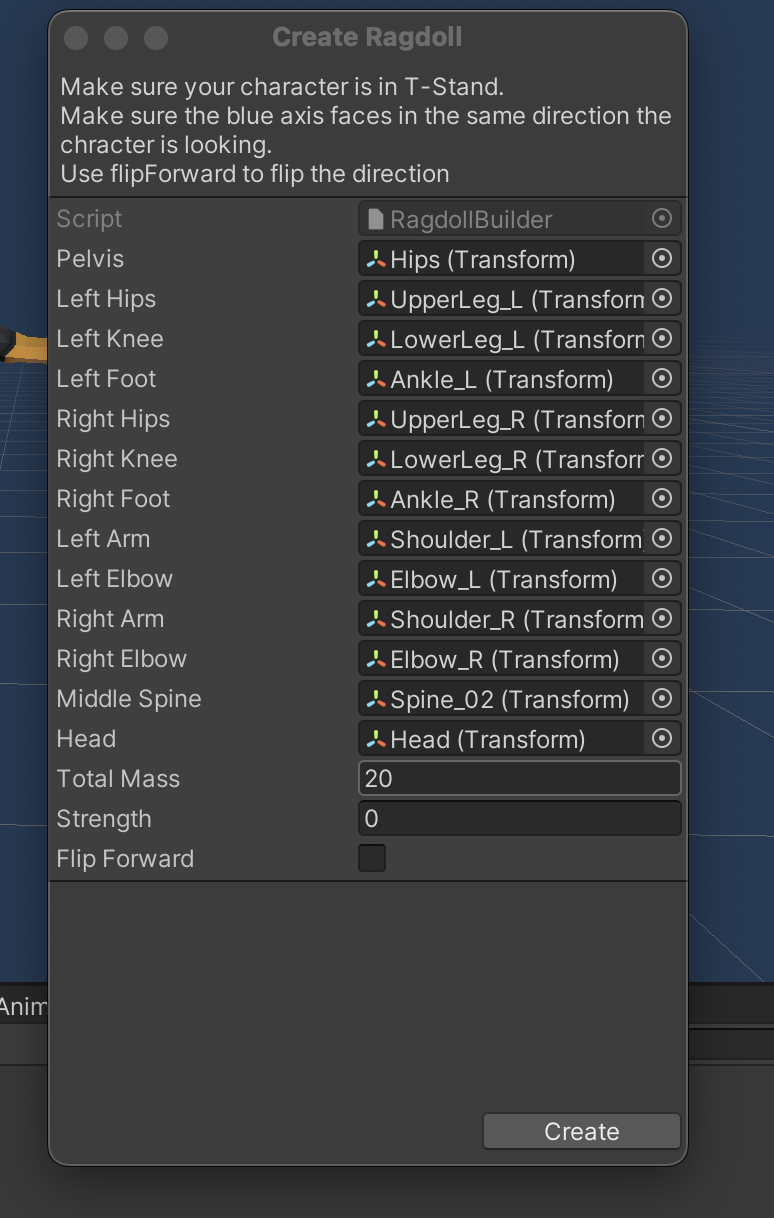
알맞는 객체를 연결한 뒤에 총기 객체는 다시 활성화.
- 비활성화해두지 않으면 Ragdoll Wizard 가 총기까지 몸으로 인식해서 Ragdoll 정보 생성.
Ragdoll Prefab 으로 객체를 만들어서 씬에 두면 바로 애니메이션이 실행된다.
충돌 애니메이션이 이상하면 Collider 를 수정해보자. 강의에서는 이상하게 작게 설정되어있던 Collider 하나를 크게 만들어줘서 해결했다.
Ragdoll 설정이 끝났으면, Unit 이 죽을 때 Ragdoll 을 생성해서 보여주자.
public class UnitRagdollSpawner : MonoBehaviour
{
    // ...

    private void Awake()
    {
        // ...
        healthSystem.OnDead += HealthSystem_OnDead;
    }

    private void HealthSystem_OnDead(object sender, EventArgs e)
    {
        Transform ragdollTransform = Instantiate(ragdollPrefab, transform.position, transform.rotation);
        UnitRagdoll unitRagdoll = ragdollTransform.GetComponent<UnitRagdoll>();
        unitRagdoll.Setup(originalRootBorn);
    }
}
그냥 생성만 해버리면 기존 Unit 이 자세와 달리 T 포즈로 나와서 쓰러질 것이므로, 기존 Unit 의 자세와 일치시키자.
public class UnitRagdoll : MonoBehaviour
{
    [SerializeField] private Transform ragdollRootBorn;

    public void Setup(Transform originalRootBorn)
    {
        MatchAllChildTransform(originalRootBorn, ragdollRootBorn);
    }

    private void MatchAllChildTransform(Transform root, Transform clone)
    {
        foreach(Transform child in root)
        {
            Transform cloneChild = clone.Find(child.name);
            if(cloneChild != null)
            {
                cloneChild.position = child.position;
                cloneChild.rotation = child.rotation;
                MatchAllChildTransform(child, cloneChild);
            }
        }
    }
}
#2
오오 래그돌 재밌다.